The remote work revolution transformed spare bedrooms and kitchen corners into full-time offices. Yet many home offices suffer from inadequate lighting that strains eyes, reduces productivity, and creates unnecessary fatigue. Understanding proper workspace illumination can dramatically improve your work-from-home experience.
The Three Layers of Office Lighting
Effective workspace lighting combines three distinct layers:
Ambient Lighting: Overall room illumination from ceiling fixtures or natural light. This base layer ensures you can navigate the space safely and see general surroundings.
Task Lighting: Focused illumination for specific work activities—reading documents, writing, detailed computer work. This layer is where most home offices fall short.
Accent Lighting: Decorative elements that add visual interest and reduce harsh contrasts between bright work areas and dark surroundings.
Neglecting any layer creates problems. Ambient-only lighting causes eye strain from insufficient task illumination. Task-only lighting creates fatiguing brightness contrasts.
Choosing the Right Desk Lamp
Your desk lamp is the most critical lighting element for productive work:
Adjustable Designs: Lamps with articulating arms and swivel heads allow precise light positioning as tasks change throughout the day.
Adequate Output: Aim for 450-800 lumens of task lighting. Detailed work like reading fine print or crafts may require 800+ lumens.
Color Temperature: Office work typically benefits from neutral to cool light (3500-5000K). Warmer temperatures (2700-3000K) suit evening work to support healthy sleep patterns.
Glare Control: Diffused or shaded light sources prevent harsh glare on screens and documents.
Classic options like bankers lamps have illuminated professional desks for over a century. Their design directs light downward onto work surfaces while the distinctive glass shades reduce glare and soften light quality—principles that remain relevant for today’s home offices.
Positioning Desk Lamps Correctly
Lamp placement significantly impacts effectiveness:
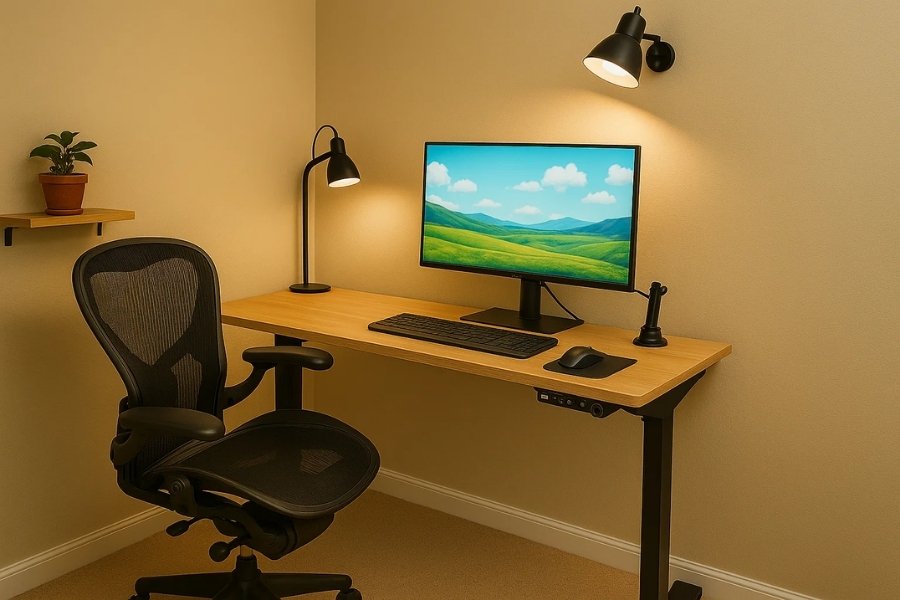
For Right-Handed Users: Position lamps on the left side of your desk. This prevents your writing hand from casting shadows across your work.
For Left-Handed Users: Place lamps on the right side for the same reason.
For Computer Work: Position task lighting beside monitors, not behind them. Light behind screens creates uncomfortable brightness contrasts.
Height Matters: Lamp bases should position light sources approximately 15 inches above desk surfaces. Adjustable lamps allow fine-tuning.
Managing Screen Glare
Computer-based work presents unique lighting challenges:
Monitor Positioning: Place screens perpendicular to windows, not facing them or with backs to them. This eliminates direct glare and harsh backlighting.
Ambient Balance: Match ambient light levels to screen brightness. Working in dark rooms with bright screens causes eye strain.
Anti-Glare Measures: Matte screen protectors, monitor hoods, or window treatments reduce problematic reflections.
Bias Lighting: Soft illumination behind monitors reduces eye fatigue by decreasing contrast between bright screens and dark surroundings.
Natural Light Integration
Daylight offers significant benefits when properly managed:
Health Benefits: Natural light supports circadian rhythms, improving sleep quality and daytime alertness.
Energy Savings: Maximizing daylight reduces electric lighting needs during working hours.
Mood Enhancement: Studies consistently link natural light exposure to improved mood and productivity.
However, uncontrolled natural light creates problems. Direct sunlight causes glare and overheating. Variable cloud cover makes consistent illumination difficult. Window treatments allowing light while controlling intensity prove essential.
The Eye Strain Epidemic
Digital eye strain affects up to 90% of computer workers. Proper lighting is one of the most effective preventive measures:
The 20-20-20 Rule: Every 20 minutes, look at something 20 feet away for 20 seconds. This relaxes eye focusing muscles.
Blink Consciously: Computer users blink less frequently, causing dry eyes. Make deliberate blinking a habit.
Appropriate Brightness: Match screen brightness to surrounding light levels. Screens should appear similar to a white paper sheet in your environment.
Blue Light Consideration: While research continues, blue light filtering glasses or screen settings may reduce strain for sensitive individuals.
Lighting for Video Conferences
Remote work means frequent video calls. Lighting affects your appearance dramatically:
Front Lighting: Position light sources in front of you (behind your camera). This illuminates your face evenly.
Avoid Backlighting: Bright windows behind you create silhouettes. Close blinds or reposition your desk.
Soft Is Better: Harsh direct light creates unflattering shadows. Diffused light sources or bounced light produce more professional appearances.
Eye-Level Positioning: Lights positioned at eye level minimize under-eye shadows and create natural-looking illumination.
Creating All-Day Comfort
Your lighting needs change throughout the workday:
Morning: Cooler, brighter light supports alertness and focus.
Afternoon: Maintain consistent task lighting as natural light shifts.
Evening: Transition to warmer, dimmer light to support eventual sleep.
Smart bulbs or tunable fixtures can automate these transitions, supporting natural circadian rhythms while maintaining adequate task illumination.
Investing in proper home office lighting improves productivity, protects your vision, and enhances your professional appearance—making it one of the most impactful work-from-home upgrades.